nodejs一次内存溢出定位和解决方案
公司电脑增加内存到48G后,项目运行npm run dev:test总是在修改生效后热更新阶段出现JavaScript heap out of memory,没加内存前,顶多是跑不动,增加内存了,动不动就终止进程。
下面是控制台输出
1
2
3
4
5
6
7
8
9
10
11
12
13
14
15
16
17
18
19
20
21
22
23
24
25
26
27
28
29
30
31
32
33
34
35
36
37
38
95% emitting CopyPlugin

[23456:00000191F6233FD0]   248918 ms: Mark-sweep 3938.0 (4134.7) -> 3936.5 (4129.6) MB, 956.7 / 0.1 ms  (average mu = 0.121, current mu = 0.003) allocation failure scavenge might not succeed[23456:00000191F6233FD0]   250058 ms: Mark-sweep 3942.0 (4134.6) -> 3936.5 (4126.1) MB, 1129.1 / 0.1 ms  (average mu = 0.072, current mu = 0.009) allocation failure scavenge might not succeed

FATAL ERROR: Ineffective mark-compacts near heap limit Allocation failed - JavaScript heap out of memory
 1: 00007FF7C6CD61BF napi_wrap+133519
 2: 00007FF7C6C6F6D6 DSA_meth_get_flags+63062
 3: 00007FF7C6C7056D node::OnFatalError+301
 4: 00007FF7C755599E v8::Isolate::ReportExternalAllocationLimitReached+94
 5: 00007FF7C753A78D v8::SharedArrayBuffer::Externalize+781
 6: 00007FF7C73E3F8C v8::internal::Heap::EphemeronKeyWriteBarrierFromCode+1516
 7: 00007FF7C73EF3AA v8::internal::Heap::ProtectUnprotectedMemoryChunks+1258
 8: 00007FF7C73EC4E9 v8::internal::Heap::PageFlagsAreConsistent+2457
 9: 00007FF7C73E1081 v8::internal::Heap::CollectGarbage+2049
10: 00007FF7C73DF285 v8::internal::Heap::AllocateExternalBackingStore+1349
11: 00007FF7C73F9115 v8::internal::GCIdleTimeHandler::ShouldDoContextDisposalMarkCompact+1029
12: 00007FF7C73F9565 v8::internal::Factory::AllocateRaw+37
13: 00007FF7C740DBDF v8::internal::FactoryBase::NewRawTwoByteString+79
14: 00007FF7C7201169 v8::internal::String::SlowFlatten+441
15: 00007FF7C70AFCD0 unibrow::Utf8::EncodeOneByte+656
16: 00007FF7C7561426 v8::String::Utf8Length+22
17: 00007FF7C6C8F497 v8::internal::Malloced::operator delete+21831
18: 00007FF7C750299F v8::internal::Builtins::builtin_handle+322591
19: 00007FF7C7501F34 v8::internal::Builtins::builtin_handle+319924
20: 00007FF7C7502228 v8::internal::Builtins::builtin_handle+320680
21: 00007FF7C7502073 v8::internal::Builtins::builtin_handle+320243
22: 00007FF7C75E0EAD v8::internal::SetupIsolateDelegate::SetupHeap+474477
23: 000000CB5D2A2B9E
npm ERR! code ELIFECYCLE
npm ERR! errno 134
npm ERR! xxx-h5@0.1.0 dev:test: `cross-env NODE_ENV=development PACKAGE_TYPE=service vue-cli-service serve --mode test`
npm ERR! Exit status 134
npm ERR!
npm ERR! Failed at the xxx-h5@0.1.0 dev:test script.
npm ERR! This is probably not a problem with npm. There is likely additional logging output above.

npm ERR! A complete log of this run can be found in:
npm ERR!     C:\Users\pe7er\AppData\Roaming\npm-cache\_logs\2024-03-12T07_03_18_962Z-debug.log
具体错误日志
1
2
3
4
5
6
7
8
9
10
11
12
13
14
15
16
17
18
19
20
21
22
23
24
25
26
27
28
29
30
31
32
33
34
35
36
37
38
39
40
41
info it worked if it ends with ok
verbose cli [
verbose cli   'C:\\Program Files\\nodejs\\node.exe',
verbose cli   'C:\\Program Files\\nodejs\\node_modules\\npm\\bin\\npm-cli.js',
verbose cli   'run',
verbose cli   'dev:test'
verbose cli ]
info using npm@6.14.18
info using node@v14.21.3
verbose run-script [ 'predev:test', 'dev:test', 'postdev:test' ]
info lifecycle xxx-h5@0.1.0~predev:test: xxx-h5@0.1.0
info lifecycle xxx-h5@0.1.0~dev:test: xxx-h5@0.1.0
verbose lifecycle xxx-h5@0.1.0~dev:test: unsafe-perm in lifecycle true
verbose lifecycle xxx-h5@0.1.0~dev:test: CWD: C:\Users\pe7er\Documents\Developer\gitlab\xxx-h5-web-next
silly lifecycle xxx-h5@0.1.0~dev:test: Args: [
silly lifecycle   '/d /s /c',
silly lifecycle   'cross-env NODE_ENV=development PACKAGE_TYPE=service vue-cli-service serve --mode test'
silly lifecycle ]
silly lifecycle xxx-h5@0.1.0~dev:test: Returned: code: 134  signal: null
info lifecycle xxx-h5@0.1.0~dev:test: Failed to exec dev:test script
verbose stack Error: xxx-h5@0.1.0 dev:test: `cross-env NODE_ENV=development PACKAGE_TYPE=service vue-cli-service serve --mode test`
verbose stack Exit status 134
verbose stack     at EventEmitter. (npm-lifecycle/index.js:332:16)
verbose stack     at EventEmitter.emit (events.js:400:28)
verbose stack     at ChildProcess. (npm-lifecycle/lib/spawn.js:55:14)
verbose stack     at ChildProcess.emit (events.js:400:28)
verbose stack     at maybeClose (internal/child_process.js:1088:16)
verbose stack     at Process.ChildProcess._handle.onexit (internal/child_process.js:296:5)
verbose pkgid xxx-h5@0.1.0
verbose cwd C:\Users\pe7er\Documents\Developer\gitlab\xxx-h5-web-next
verbose Windows_NT 10.0.19044
verbose argv "node.exe" "npm-cli.js" "run" "dev:test"
verbose node v14.21.3
verbose npm  v6.14.18
error code ELIFECYCLE
error errno 134
error xxx-h5@0.1.0 dev:test: `cross-env NODE_ENV=development PACKAGE_TYPE=service vue-cli-service serve --mode test`
error Exit status 134
error Failed at the xxx-h5@0.1.0 dev:test script.
error This is probably not a problem with npm. There is likely additional logging output above.
verbose exit [ 134, true ]
看起来眼睛痛,但其实关键的信息就两句
allocation failure scavenge might not succeed(分配失败,清除程序可能不会成功)FATAL ERROR: Ineffective mark-compacts near heap limit Allocation failed - JavaScript heap out of memory(致命错误:无效的标记压缩接近堆限制分配失败 - JavaScript 堆内存不足) 增加node的max_old_space_size即可,“旧空间”是 V8 托管(也称为垃圾收集)堆(即 JavaScript 对象所在的位置)中最大和最可配置的部分,并且--max-old-space-size标志控制其最大大小。随着内存消耗接近极限,V8 将花费更多时间在垃圾收集上,以释放未使用的内存。
加多少合适呢,可以参考下面的文档。
参考文档:
stackoverflow.com/questions/4…
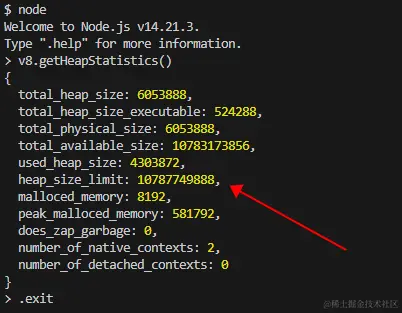
没加内存前的默认配置

tip:退出使用.exit
widnow可以打开一个cmd或shell,一般你用什么终端启动项目,就在哪个终端里执行下面的命令,如果使用gitbash,则需要用下面的linux/unix的命令。 我的电脑内存比较富裕,直接给最大10g,但实际上给大一些,内存也没有满过,V8的GC(内存垃圾回收)还是很强的。
1
setx NODE_OPTIONS --max_old_space_size=10240
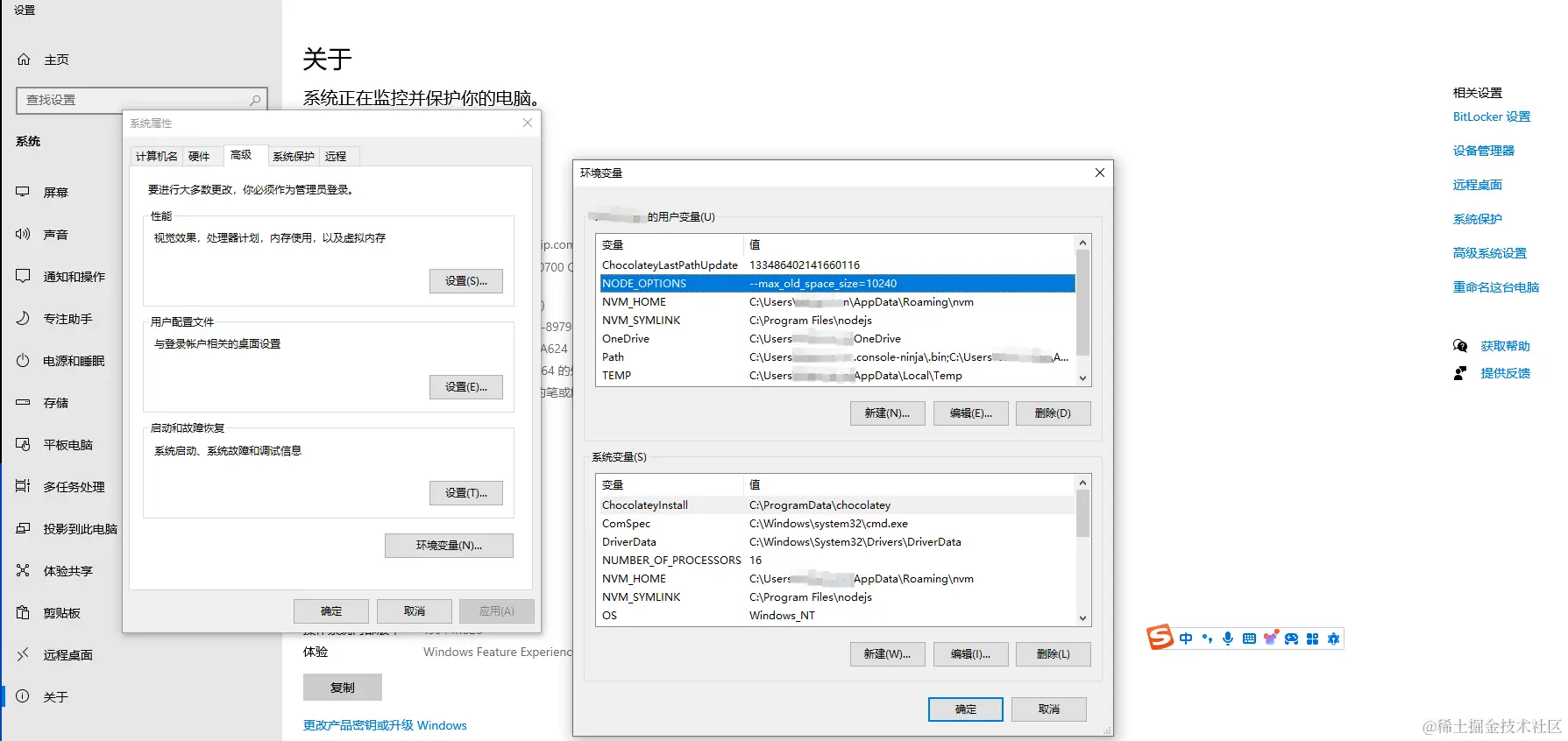
按照上面的方法设置后,不仅项目启动速度变快了,热更新时再也没有因为垃圾回收内存不够造成项目中断的情况了,问题解决。 设置也可以手动去设置 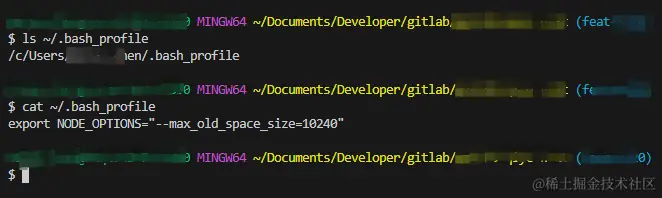
每次打开cmd和powershell启动项目时都会生效。
如果想在window下的git_bash中永久生效,则则需要再用户主目录下的.bash_profile(不能存在就需要创建,建议UTF-8字符集)里配置,重新打开git_bash就可以生效了。
1
export NODE_OPTIONS="--max_old_space_size=10240"
扩展
linux/unix可以打开一个zsh、shell里执行
1
export NODE_OPTIONS="--max_old_space_size=10240"
但这只是临时的,关闭shell后,就会失效,如果想要长期生效,可以将这句命令添加到~/.profile、~/.zshrc,具体加到哪里,看你使用的终端类型。
当然也可以直接使用node
1
$ node --max-old-space-size=8192 index.js
也可以在当前项目中设置
1
2
3
4
5
{
  "scripts": {
    "dev:test": "node --max-old-space-size=8192 其他命令"
  }
}
可以使用cross-env来抹平系统差异
1
2
3
4
5
{
  "scripts": {
    "dev:test": "cross-env NODE_OPTIONS=--max-old-space-size=8192 其他命令"
  }
}
如果觉得上面的方法比较繁琐,也可以使用下面的方法.
increase-memory-limit
- 安装并增加内存限制: 首先,运行以下命令安装内存限制工具:
1
npm install -g increase-memory-limit
然后,执行增加内存限制的命令:
1
increase-memory-limit
- 尝试运行项目: 尝试运行项目时,有一部分电脑可能可以直接执行成功,但也有可能再次报错:
1
“node --max-old-space-size=10240“ 不是内部或外部命令,也不是可运行的程序
- 解决报错问题: 如果遇到上述报错,可以通过以下步骤解决:
替换 ./node_modules/.bin 下 .bat 文件夹中的 "%_prog%",将其替换成 %_prog%(去掉双引号)。
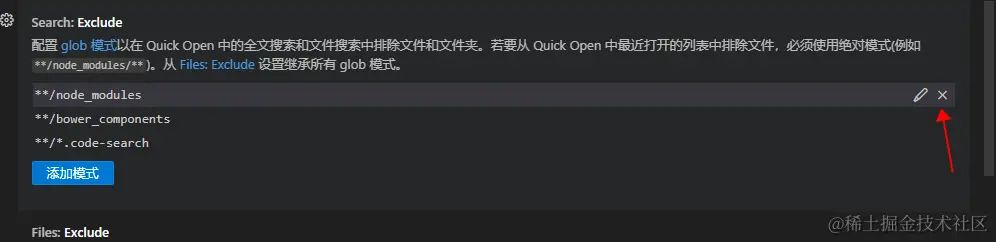
- 打开 VS Code 设置,找到 Search: Exclude 选项。
- 删除
**/node_modules项。 - 再次运行项目: 现在,尝试重新运行项目,应该可以正常运行了。 解决后记得将删除的
**/node_modules添加回去,提高vscode的性能。